
How to Run Windows Update and Restart Properly
Keeping your Windows system up to date ensures you have the latest security patches, bug fixes, and feature improvements. Follow these steps to run Windows Update and restart your computer the right way.
1. Open Windows Update Settings
- Go to Settings
- In the left menu, click Windows Update
2. Check for Updates
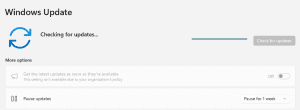
- Click Check for updates
- Windows will search for any available updates
3. Install Updates
- If updates are found, click Download and install.
- Wait for the updates to finish installing.
4. Restart Your Computer Properly
- If a restart is required, click Restart now when prompted.
- If you are not ready to restart immediately, save your work and restart manually as soon as possible.
Important: Use the Restart option, not Shut down, to ensure updates are applied correctly.
5. Verify Updates
After the restart, go back to Settings > Windows Update to make sure there are no remaining pending updates.
Was this helpful?
By voting, you consent to anonymous data collection to prevent duplicate votes. No personal information is stored.